helm安装
环境说明
helm环境
10.2.21.47
[root@prometheus harbor_ip]# pwd
/home/opt/helm/harbor/harbor_ip
临时配置k8s证书
export KUBECONFIG=/etc/kubernetes/admin.conf


k8s环境
10.1.6.104
检查helm版本和源
# helm version
version.BuildInfo{Version:"v3.11.2", GitCommit:"912ebc1cd10d38d340f048efaf0abda047c3468e", GitTreeState:"clean", GoVersion:"go1.18.10"}
# helm repo list
NAME    URL
aliyun  https://kubernetes.oss-cn-hangzhou.aliyuncs.com/charts
bitnami https://charts.bitnami.com/bitnami
# helm search repo harbor
NAME            CHART VERSION   APP VERSION     DESCRIPTION
bitnami/harbor  19.0.5          2.9.0           Harbor is an open source trusted cloud-native r...
helm repo add harbor https://helm.goharbor.io   //官网的源,一般无法访问添加
helm fetch harbor/harbor --untar        //下载参考命令
下载harbor到本地
# helm fetch bitnami/harbor
# ls
harbor-19.0.5.tgz
# helm fetch bitnami/harbor --untar // 以解压方式下载到本地
# ls
harbor  harbor-19.0.5.tgz
创建证书
参考命令
# 其中 Common Name 必须要设置为和你要给 Harbor 的域名保持一致
# 获得证书
openssl req -newkey rsa:4096 -nodes -sha256 -keyout ca.key -x509 -days 3650 -out ca.crt

# 生成证书签名请求
openssl req -newkey rsa:4096 -nodes -sha256 -keyout tls.key -out tls.csr

# 生成证书
openssl x509 -req -days 3650 -in tls.csr -CA ca.crt -CAkey ca.key -CAcreateserial -out tls.crt
操作日志
# openssl req -newkey rsa:4096 -nodes -sha256 -keyout ca.key -x509 -days 3650 -out ca.crt
Generating a RSA private key
..........................................................................................................++++
.............++++
writing new private key to 'ca.key'
-----
You are about to be asked to enter information that will be incorporated
into your certificate request.
What you are about to enter is what is called a Distinguished Name or a DN.
There are quite a few fields but you can leave some blank
For some fields there will be a default value,
If you enter '.', the field will be left blank.
-----
Country Name (2 letter code) [AU]:cn
State or Province Name (full name) [Some-State]:
Locality Name (eg, city) []:sh
Organization Name (eg, company) [Internet Widgits Pty Ltd]:
Organizational Unit Name (eg, section) []:
Common Name (e.g. server FQDN or YOUR name) []:k8s.harbor.com
Email Address []:
# openssl req -newkey rsa:4096 -nodes -sha256 -keyout tls.key -out tls.csr
Generating a RSA private key
.....................++++
...............................................................................................................................++++
writing new private key to 'tls.key'
-----
You are about to be asked to enter information that will be incorporated
into your certificate request.
What you are about to enter is what is called a Distinguished Name or a DN.
There are quite a few fields but you can leave some blank
For some fields there will be a default value,
If you enter '.', the field will be left blank.
-----
Country Name (2 letter code) [AU]:cn
State or Province Name (full name) [Some-State]:
Locality Name (eg, city) []:sh
Organization Name (eg, company) [Internet Widgits Pty Ltd]:
Organizational Unit Name (eg, section) []:
Common Name (e.g. server FQDN or YOUR name) []:k8s.harbor.com
Email Address []:

Please enter the following 'extra' attributes
to be sent with your certificate request
A challenge password []:
An optional company name []:
# openssl x509 -req -days 3650 -in tls.csr -CA ca.crt -CAkey ca.key -CAcreateserial -out tls.crt
Signature ok
subject=C = cn, ST = Some-State, L = sh, O = Internet Widgits Pty Ltd, CN = k8s.harbor.com
Getting CA Private Key
# ls
ca.crt  ca.key  ca.srl  tls.crt  tls.csr  tls.key
创建secret
# kubectl get secret -n harbor
No resources found in harbor namespace.
kubectl create secret generic k8s.harbor.com-tls --from-file=tls.crt --from-file=tls.key --from-file=ca.crt -n harbor
secret/k8s.harbor.com-tls created
# kubectl get secret -n harbor
NAME             TYPE     DATA   AGE
k8s.harbor.com-tls   Opaque   3      4s
配置文件
values.yaml
创建nginx-ingress
# tree -LN 1
.
├── controller.tar  //国外依赖镜像
├── deploy-replace-k8s.yaml //主yaml文件
├── deploy.yaml
├── ingress-nginx.yaml  //案例测试文件
└── kube-webhook-certgen.tar    //国外依赖镜像

0 directories, 5 files
deploy-replace-k8s.yaml
ingress-nginx.yaml
基于nfs共享的pv client相关
# kubectl get pod -n harbor
NAME                                      READY   STATUS    RESTARTS      AGE
nfs-client-provisioner-786df859f6-4k44v   1/1     Running   0             4d1h
# kubectl get storageclass -A
NAME                 PROVISIONER      RECLAIMPOLICY   VOLUMEBINDINGMODE   ALLOWVOLUMEEXPANSION   AGE
harbor-nfs-storage   fuseim.pri/ifs   Delete          Immediate           true                   4d2h
# cat harbor-nfs-storage.yaml
---
apiVersion: storage.k8s.io/v1
kind: StorageClass
metadata:
  name: harbor-nfs-storage
provisioner: fuseim.pri/ifs # or choose another name, must match deployment's env PROVISIONER_NAME'
parameters:
  archiveOnDelete: "false"
volumeBindingMode: Immediate
allowVolumeExpansion: true
---
apiVersion: v1
kind: ServiceAccount
metadata:
  name: nfs-client-provisioner
  # replace with namespace where provisioner is deployed
  namespace: harbor
---
kind: ClusterRole
apiVersion: rbac.authorization.k8s.io/v1
metadata:
  name: nfs-client-provisioner-runner
rules:
  - apiGroups: [""]
    resources: ["persistentvolumes"]
    verbs: ["get", "list", "watch", "create", "delete"]
  - apiGroups: [""]
    resources: ["persistentvolumeclaims"]
    verbs: ["get", "list", "watch", "update"]
  - apiGroups: ["storage.k8s.io"]
    resources: ["storageclasses"]
    verbs: ["get", "list", "watch"]
  - apiGroups: [""]
    resources: ["events"]
    verbs: ["create", "update", "patch"]
---
kind: ClusterRoleBinding
apiVersion: rbac.authorization.k8s.io/v1
metadata:
  name: run-nfs-client-provisioner
subjects:
  - kind: ServiceAccount
    name: nfs-client-provisioner
    # replace with namespace where provisioner is deployed
    namespace: harbor
roleRef:
  kind: ClusterRole
  name: nfs-client-provisioner-runner
  apiGroup: rbac.authorization.k8s.io
---
kind: Role
apiVersion: rbac.authorization.k8s.io/v1
metadata:
  name: leader-locking-nfs-client-provisioner
  # replace with namespace where provisioner is deployed
  namespace: harbor
rules:
  - apiGroups: [""]
    resources: ["endpoints"]
    verbs: ["get", "list", "watch", "create", "update", "patch"]
---
kind: RoleBinding
apiVersion: rbac.authorization.k8s.io/v1
metadata:
  name: leader-locking-nfs-client-provisioner
  # replace with namespace where provisioner is deployed
  namespace: harbor
subjects:
  - kind: ServiceAccount
    name: nfs-client-provisioner
    # replace with namespace where provisioner is deployed
    namespace: harbor
roleRef:
  kind: Role
  name: leader-locking-nfs-client-provisioner
  apiGroup: rbac.authorization.k8s.io

---
apiVersion: apps/v1
kind: Deployment
metadata:
  name: nfs-client-provisioner
  labels:
    app: nfs-client-provisioner
  # replace with namespace where provisioner is deployed
  namespace: harbor
spec:
  replicas: 1
  strategy:
    type: Recreate
  selector:
    matchLabels:
      app: nfs-client-provisioner
  template:
    metadata:
      labels:
        app: nfs-client-provisioner
    spec:
      serviceAccountName: nfs-client-provisioner
      containers:
        - name: nfs-client-provisioner
          image: registry.cn-hangzhou.aliyuncs.com/lfy_k8s_images/nfs-subdir-external-provisioner:v4.0.2
          volumeMounts:
            - name: nfs-client-root
              mountPath: /persistentvolumes
          env:
            - name: PROVISIONER_NAME
              value: fuseim.pri/ifs
            - name: NFS_SERVER
              value: 10.1.6.105
            - name: NFS_PATH
              value: /home/nfsdata/harbor
      volumes:
        - name: nfs-client-root
          nfs:
            server: 10.1.6.105
            path: /home/nfsdata/harbor
执行安装
# helm repo list
NAME    URL
aliyun  https://kubernetes.oss-cn-hangzhou.aliyuncs.com/charts
gitlab  https://charts.gitlab.io
kong    https://charts.konghq.com

// 添加如下的源,否则提示
// helm install INSTALLATION FAILED: repo bitnami not found
# helm repo add bitnami https://charts.bitnami.com/bitnami
# helm install harbor bitnami/harbor --version 19.0.5 -f values.yaml -n harbor
// 本次实验涉及到的镜像
# nerdctl image ls | grep bitnami | grep  minutes

bitnami/harbor-adapter-trivy                                                        2.9.0-debian-11-r27             de69c3076e83    55 minutes ago    linux/amd64    291.4 MiB    86.1 MiB
bitnami/harbor-core                                                                 2.9.0-debian-11-r24             895913b4484e    47 minutes ago    linux/amd64    152.4 MiB    50.9 MiB
bitnami/harbor-jobservice                                                           2.9.0-debian-11-r26             31fa78219084    48 minutes ago    linux/amd64    134.2 MiB    47.1 MiB
bitnami/harbor-portal                                                               2.9.0-debian-11-r37             9c882133f63a    57 minutes ago    linux/amd64    105.7 MiB    35.9 MiB
bitnami/harbor-registry                                                             2.9.0-debian-11-r36             d3dc52400ed0    47 minutes ago    linux/amd64    108.5 MiB    37.8 MiB
bitnami/harbor-registryctl                                                          2.9.0-debian-11-r24             0afb0c22ea4f    47 minutes ago    linux/amd64    139.4 MiB    49.0 MiB
bitnami/nginx                                                                       1.25.2-debian-11-r47            fbd9335f55d8    17 minutes ago    linux/amd64    97.8 MiB     34.0 MiB
bitnami/postgresql                                                                  13.12.0-debian-11-r57           0e46a89dfa29    13 minutes ago    linux/amd64    280.3 MiB    87.0 MiB
bitnami/redis                                                                       7.2.1-debian-11-r24             0897825c35d5    10 minutes ago    linux/amd64    103.3 MiB    36.3 MiB
bitnami/redis                                                                       <none>                          0897825c35d5    10 minutes ago    linux/amd64    103.3 MiB    36.3 MiB
# helm install harbor bitnami/harbor --version 19.0.5 -f values.yaml -n harbor
NAME: harbor
LAST DEPLOYED: Fri Oct 27 14:34:49 2023
NAMESPACE: harbor
STATUS: deployed
REVISION: 1
TEST SUITE: None
NOTES:
CHART NAME: harbor
CHART VERSION: 19.0.5
APP VERSION: 2.9.0

** Please be patient while the chart is being deployed **

1. Get the Harbor URL:

  You should be able to access your new Harbor installation through https://k8s.harbor.com

2. Login with the following credentials to see your Harbor application

  echo Username: "admin"
  echo Password: $(kubectl get secret --namespace harbor harbor-core-envvars -o jsonpath="{.data.HARBOR_ADMIN_PASSWORD}" | base64 -d)
# kubectl get ingress -n harbor
NAME             CLASS    HOSTS            ADDRESS   PORTS   AGE
harbor-ingress   <none>   k8s.harbor.com             80      23m
# kubectl get pod -n harbor
NAME                                      READY   STATUS    RESTARTS   AGE
harbor-core-7cfcc5c5f4-5mr8k              1/1     Running   0          18m
harbor-jobservice-59dbcccb49-jwxvd        1/1     Running   0          17m
harbor-portal-6558598f6-6rqdv             1/1     Running   0          23m
harbor-postgresql-0                       1/1     Running   0          23m
harbor-redis-master-0                     1/1     Running   0          23m
harbor-registry-78fc99fcd9-fzqrr          2/2     Running   0          23m
harbor-trivy-0                            1/1     Running   0          23m
nfs-client-provisioner-786df859f6-4k44v   1/1     Running   0          23h
# kubectl get pv
NAME                                       CAPACITY   ACCESS MODES   RECLAIM POLICY   STATUS   CLAIM                                       STORAGECLASS         REASON   AGE
clusterpedia-internalstorage-mysql         20Gi       RWO            Retain           Bound    clusterpedia-system/internalstorage-mysql                                 15d
pvc-21dbc798-917e-4ef7-87f6-3e403f4549c7   1Gi        RWO            Delete           Bound    harbor/harbor-jobservice                    harbor-nfs-storage            46m
pvc-59309ef1-1e26-41a4-aa22-1d3682adddd8   8Gi        RWO            Delete           Bound    harbor/redis-data-harbor-redis-master-0     harbor-nfs-storage            46m
pvc-8ef50434-8a36-4a76-a0b2-3e1f81c8ea23   8Gi        RWO            Delete           Bound    harbor/data-harbor-postgresql-0             harbor-nfs-storage            46m
pvc-d171851d-53a4-44b7-a2dd-298fb2db4dcd   1Gi        RWO            Delete           Bound    harbor/harbor-jobservice-scandata           harbor-nfs-storage            46m
pvc-e13ebe61-0168-40e3-8dbd-c7a82480149a   5Gi        RWO            Delete           Bound    harbor/data-harbor-trivy-0                  harbor-nfs-storage            46m
pvc-e675e2f5-cd0d-4c87-9edf-10911a3e950a   5Gi        RWO            Delete           Bound    harbor/harbor-registry                      harbor-nfs-storage            46m
# kubectl get pvc  -n harbor
NAME                               STATUS   VOLUME                                     CAPACITY   ACCESS MODES   STORAGECLASS         AGE
data-harbor-postgresql-0           Bound    pvc-8ef50434-8a36-4a76-a0b2-3e1f81c8ea23   8Gi        RWO            harbor-nfs-storage   46m
data-harbor-trivy-0                Bound    pvc-e13ebe61-0168-40e3-8dbd-c7a82480149a   5Gi        RWO            harbor-nfs-storage   46m
harbor-jobservice                  Bound    pvc-21dbc798-917e-4ef7-87f6-3e403f4549c7   1Gi        RWO            harbor-nfs-storage   46m
harbor-jobservice-scandata         Bound    pvc-d171851d-53a4-44b7-a2dd-298fb2db4dcd   1Gi        RWO            harbor-nfs-storage   46m
harbor-registry                    Bound    pvc-e675e2f5-cd0d-4c87-9edf-10911a3e950a   5Gi        RWO            harbor-nfs-storage   46m
redis-data-harbor-redis-master-0   Bound    pvc-59309ef1-1e26-41a4-aa22-1d3682adddd8   8Gi        RWO            harbor-nfs-storage   46m
此方式服务都已经启动,但是无法通过域名访问!
问题原因待查!
通过nodeport方式启动
adminPassword: "Harbor12345"
externalURL: http://10.1.6.104:30002
      storageClass: "harbor-nfs-storage"
    trivy:
      storageClass: "harbor-nfs-storage"
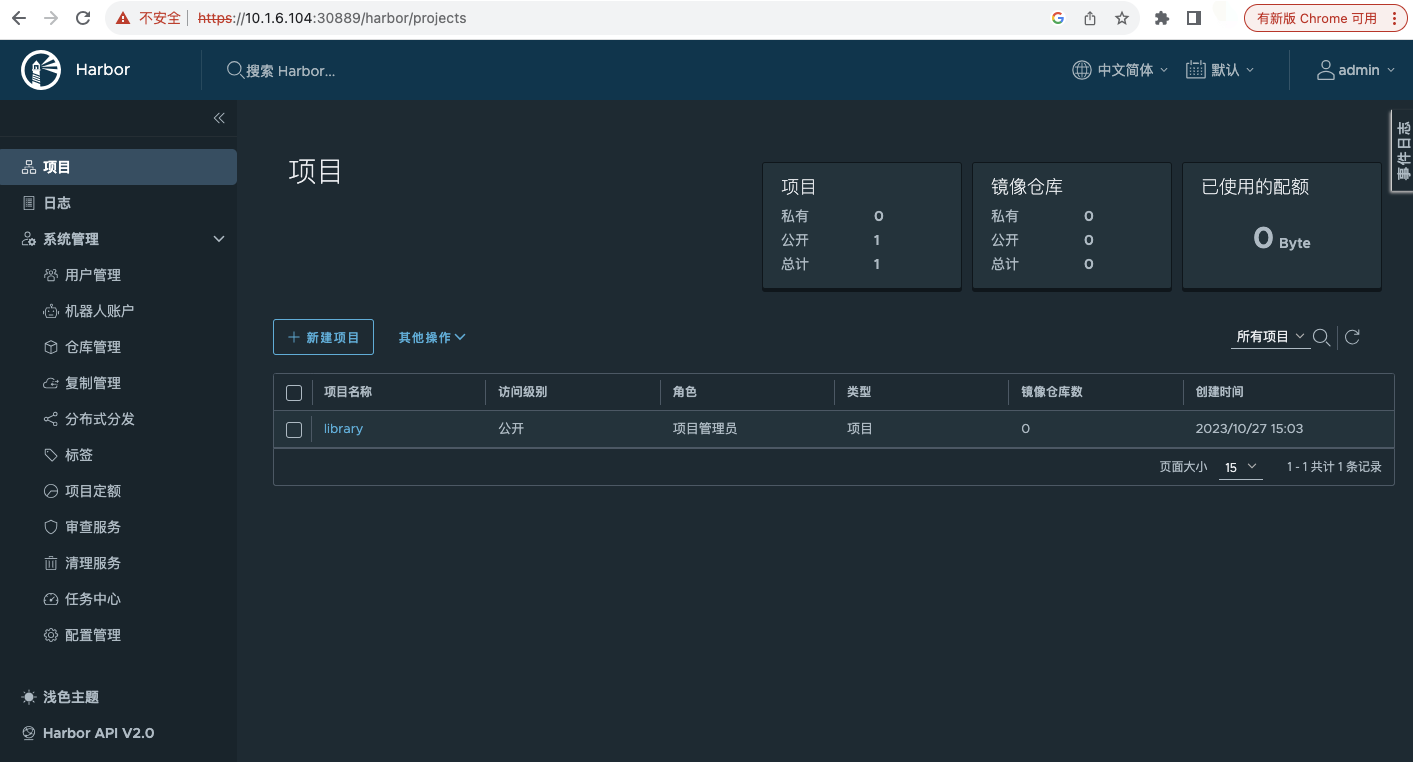
登录测试
# kubectl get svc -n harbor
NAME                    TYPE           CLUSTER-IP     EXTERNAL-IP   PORT(S)                      AGE
harbor                  LoadBalancer   10.1.9.76      <pending>     80:31316/TCP,443:30889/TCP   3h53m
harbor-core             ClusterIP      10.1.135.92    <none>        80/TCP                       3h53m
harbor-jobservice       ClusterIP      10.1.183.150   <none>        80/TCP                       3h53m
harbor-portal           ClusterIP      10.1.73.99     <none>        80/TCP                       3h53m
harbor-postgresql       ClusterIP      10.1.38.198    <none>        5432/TCP                     3h53m
harbor-postgresql-hl    ClusterIP      None           <none>        5432/TCP                     3h53m
harbor-redis-headless   ClusterIP      None           <none>        6379/TCP                     3h53m
harbor-redis-master     ClusterIP      10.1.102.137   <none>        6379/TCP                     3h53m
harbor-registry         ClusterIP      10.1.153.17    <none>        5000/TCP,8080/TCP            3h53m
harbor-trivy            ClusterIP      10.1.197.177   <none>        8080/TCP                     3h53m
域名访问策略调试
卸载
# helm uninstall harbor -n  harbor

# helm list -n  harbor
NAME    NAMESPACE       REVISION        UPDATED STATUS  CHART   APP VERSION
# kubectl get pod -n harbor
NAME                                      READY   STATUS    RESTARTS   AGE
nfs-client-provisioner-786df859f6-4k44v   1/1     Running   0          38d